How to Scale Your Service Business with Templates and Automation
If your service business stops when you stop, you don’t have a business, you have a job. The fix isn’t working more hours. It’s building systems: templates and automation that deliver your service consistently, whether you’re at your desk or on a beach.
In this guide, you’ll learn exactly how to use templates and automation to scale your service business without burning out or sacrificing quality.
Why Service Businesses Hit a Growth Ceiling
Most service businesses grow fast in the early stages, then plateau. The owner is doing everything: delivering the service, handling client communication, sending proposals, following up on invoices, and somehow also trying to market.
The ceiling isn’t a lack of clients. It’s a lack of systems.
Without standardized processes, every new client feels like starting from scratch. Every email gets rewritten. Every proposal takes hours. And every team member does things their way, not your way.
This is why learning how to scale a service business isn’t really about marketing. It’s about operations.
Quick answer: Service businesses hit a growth ceiling when delivery depends entirely on the owner’s time and memory. Templates and automation break that dependency by turning your best work into a repeatable system.
What “Systems” Actually Mean in a Service Business
A system is simply a documented, repeatable way of doing something. It combines three things:
- Templates: pre-built documents, emails, proposals, or checklists you reuse and customize
- Automation: tools that trigger actions (emails, reminders, tasks) without you lifting a finger
- SOPs: written instructions so anyone on your team can follow the process correctly
Together, these create what I call service business systems: the invisible engine that lets you deliver a consistent, high-quality experience to every client, every time.
Step 1: Map Your Core Service Delivery Process
Before you build anything, you need to understand what actually happens from the moment a client says “yes” to the moment they get their result.
Grab a piece of paper (or a free tool like Miro) and write down every step:
- Client inquires
- You send a proposal
- Client signs and pays
- Onboarding begins
- Work is delivered
- Revisions or feedback
- Project closes
- Follow-up / referral request
Now look at that list and ask: Which of these steps do I redo from scratch every single time?
Those are your biggest opportunities for templates and automation.
Quick answer: Mapping your service delivery process reveals exactly which steps are eating your time unnecessarily, and which ones are ready to be templated or automated.
Step 2: Build Templates for Every Repeating Task
Templates are the fastest win when you want to scale your service business. Here are the most impactful ones to start with:
Client Proposal Template
Instead of writing a new proposal every time, build one master document with:
- A short intro that speaks to the client’s problem
- A clear scope of work section (fill in the blanks)
- Your pricing structure
- FAQ section and next steps
A photographer, for example, can have a proposal template that takes 10 minutes to personalize instead of 2 hours to write from scratch.
Onboarding Email Sequence
The first 48 hours after a client signs are critical. A simple 3-email onboarding sequence can:
- Confirm the details and set expectations
- Share what they need to prepare or provide
- Introduce your working process and timeline
A cleaning service, a web designer, a nutritionist, anyone delivering a service can use the same structure.
Client Feedback Request Template
Most service providers forget to ask for reviews. A simple template sent at project close, “Here’s a link to leave a quick Google review if you found this valuable”, can double your testimonials over a year.
Weekly Status Update Template
If your projects run over multiple weeks, a short weekly update email keeps clients informed and reduces “just checking in…” messages significantly.
Step 3: Automate What You Can
Templates save writing time. Automation saves decision time, the mental load of remembering to send things, follow up, or trigger the next step.
Here are the most powerful automations for a service-based business:
Inquiry Auto-Response
When someone fills out your contact form, they should receive an automatic reply within seconds. This email:
- Acknowledges their inquiry
- Sets expectations on when you’ll respond
- Optionally shares your calendar link for a discovery call
Tools like Mailchimp, ConvertKit, or even Gmail’s canned responses can handle this.
Proposal Follow-Up Sequence
Send a proposal on Monday. If they haven’t opened it by Thursday, send a gentle nudge automatically. If they open it but don’t sign by day 7, send a second follow-up. This alone can increase your close rate without any extra effort.
Invoice Reminders
Stop chasing payments manually. Tools like HoneyBook, Dubsado, or Wave can automatically send invoice reminders 3 days before and after a due date.
Task Triggers Based on Client Actions
When a client signs a contract → automatically create their project folder, send onboarding email, assign tasks to your team. This is the gold standard of service business automation.
Step 4: Document Your Systems So Anyone Can Use Them
A template or automation only scales your business if someone other than you can run it.
This is where SOPs (Standard Operating Procedures) come in. For each major process in your business, write a simple document that explains:
- What needs to happen
- When it happens
- Who is responsible
- Which template or tool to use
- What “done correctly” looks like
Your SOP doesn’t need to be fancy. A Google Doc or Notion page works perfectly.
Quick answer: SOPs turn your personal knowledge into a business asset. When your team (or a future hire) can follow your systems without asking you, you’ve successfully systemized your service delivery.
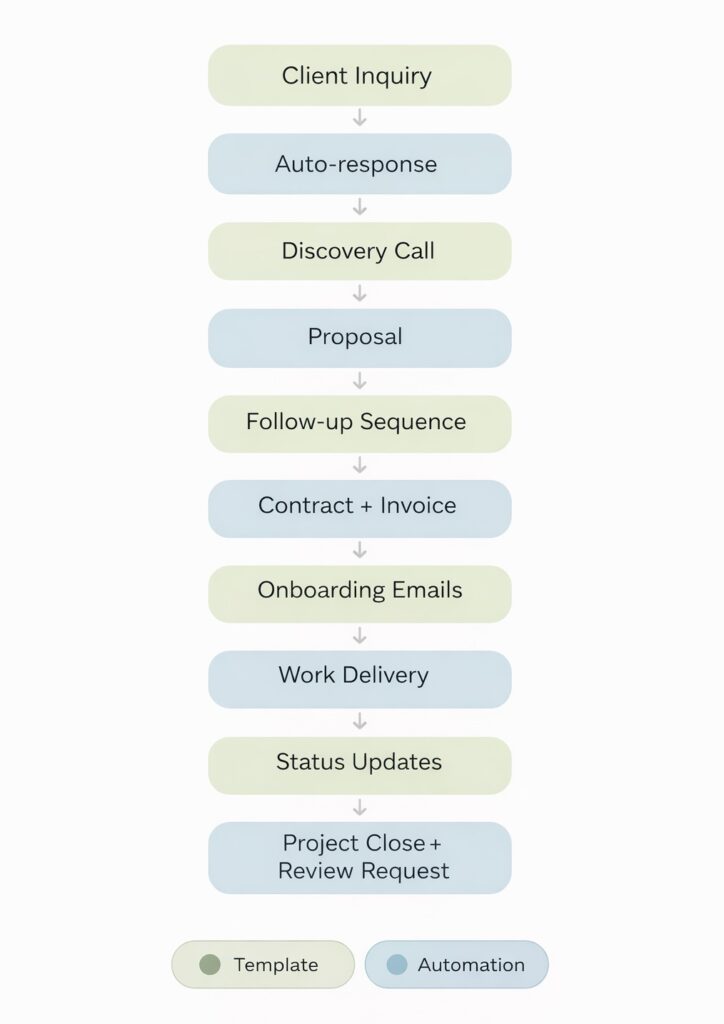
The Service Automation Flow
Here’s how all of this fits together visually:
CLIENT INQUIRY
      ↓
Auto-response sent (Automation)
      ↓
Discovery call booked (Calendar tool)
      ↓
Proposal sent (Template)
      ↓
Follow-up sequence (Automation)
      ↓
Contract signed + Invoice sent (Template)
      ↓
Onboarding emails triggered (Automation)
      ↓
Work delivery (SOP + Checklists)
      ↓
Status updates sent (Template)
      ↓
Project close + Review request (Template)
      ↓
Referral follow-up (Automation)
Each box is either a template you’ve built once, or an automation that runs without you. Together, they let you scale your service business without working more hours.
Recommended Tools for Service Business Systems
| Category | Free Option | Paid Option |
|---|---|---|
| CRM & Proposals | HoneyBook (trial) | Dubsado, HoneyBook |
| Email Automation | Mailchimp (free tier) | ConvertKit, ActiveCampaign |
| Project Management | Notion, Trello | Asana, ClickUp |
| Scheduling | Calendly (free) | Acuity Scheduling |
| Invoicing | Wave | FreshBooks, QuickBooks |
| Contracts | Docusign (trial) | HoneyBook, Dubsado |
What to Automate First (And What to Keep Human)
Not everything should be automated. Part of a great service business is the human touch, and your clients can tell when they’re talking to a robot.
Automate:
- Reminders and follow-ups
- Status updates with fixed information
- Administrative tasks (invoicing, scheduling)
- Onboarding sequences with known information
Keep human:
- Initial sales conversations
- Handling complaints or unexpected issues
- Personalized check-ins and relationship building
- Any communication that requires judgment or empathy
Frequently Asked Questions
How many templates do I need to start?
Start with three: a proposal template, an onboarding email, and a project close + review request. These cover the most time-consuming parts of client management and immediately free up hours every week.
Do I need expensive software to automate my service business?
No. Many powerful automations can be set up with free tools, Gmail filters, Calendly’s free plan, and Mailchimp’s free tier can handle a lot. Start free, upgrade when you’re ready.
How long does it take to build a basic system?
Most service providers can map their process and build their first 3 templates in a single weekend. Automations take a few more hours to set up, but they save that time back within the first month.
Can I still personalize my service if I use templates?
Absolutely. Templates aren’t about being robotic, they’re about having a strong foundation that you personalize quickly. A template that takes 10 minutes to customize is still more personal than an email that never gets sent because you ran out of time.
Start Scaling Your Service Business Today
The difference between a service business that’s always at capacity and one that actually grows is not talent. It’s systems.
Start small: pick one repeating task this week and turn it into a template. Then add one automation. Then document the process. Over a few months, you’ll have a business that delivers consistently, without you being the bottleneck every time.
Ready to get started? Download the free Service Automation Checklist, a step-by-step list of the exact templates and automations to build first, in order.
👉 Join Business Pulse and get the checklist
Or if you want a deeper look at how to build the operational foundation of a small service business, grab the free first chapter of my book Flow:
About the Author
Sara Moradi is a business educator and operations strategist who helps small service-based business owners build systems that let them grow without burning out. She is the author of Flow and the creator of the Operations Toolkit for service providers.