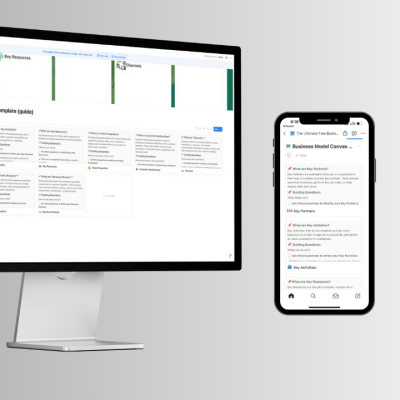
Create Your Business Model Canvas in Notion: Step-by-Step Guide
Design your entire business model in a single Notion page, no design skills needed. If you have been putting off mapping your business because you don’t know where to start, or you’ve tried sticky notes and whiteboards that end up in a drawer, this guide is for you.
I want to show you exactly how to build a Notion business model canvas from scratch, using a free template I’ve already set up for you. By the end of this article, you’ll have a living, editable canvas that actually reflects how your business works, and where it needs to improve.
🎁 Want to skip straight to the template?
Grab the free Notion BMC template below, it includes pre-filled prompts for every block and a quarterly review checklist
Why Notion Is the Best Tool for Your Business Model Canvas
Most business model canvas tools give you a static PDF or a rigid drag-and-drop board. You fill it in once, it gets out of date, and eventually you forget it exists.
Notion works differently. It’s flexible, searchable, and lives right next to your other business documents, your SOPs, client notes, and content plans. That means your canvas isn’t an isolated strategy exercise. It becomes a reference point you actually revisit.
Here’s why a business model in Notion beats every other format:
- One page, nine blocks, everything connected. Each section links to your actual operations, not a separate tool.
- Easy to update. Your business changes. Notion lets you revise without reprinting or redesigning anything.
- Free to use. Notion’s free plan is more than enough for this.
- No design skills required. The template does the layout work for you.
- Shareable with your team or consultant. Just send a link.
As I wrote in my Medium article on how the Business Model Canvas applies beyond startups, the real power of this framework isn’t in creating something new, it’s in understanding what you’re actually running right now.
What’s Inside the Notion BMC Template
Before we walk through the steps, here’s a quick look at what the Notion BMC template includes so you know what you’re working with.
| Block | What You’ll Define | Time Needed |
|---|---|---|
| Customer Segments | Who exactly you serve | 10 min |
| Value Propositions | What transformation you deliver | 15 min |
| Channels | How clients find and receive your service | 10 min |
| Customer Relationships | How you build and keep trust | 10 min |
| Revenue Streams | How and when you get paid | 10 min |
| Key Resources | What you need to deliver your service | 8 min |
| Key Activities | What you must do consistently | 8 min |
| Key Partnerships | Who else helps you deliver value | 8 min |
| Cost Structure | What you spend to keep things running | 10 min |
Total time: about 90 minutes for your first canvas. That’s one focused session, worth every minute.
The template also includes a quarterly review checklist so you don’t fill it in once and forget it. And if you offer more than one service, there’s a comparison view to map each offering separately.
How to Build Your Notion Business Model Canvas: Step-by-Step
Step 1 — Duplicate the Template Into Your Notion
Go to the free Notion BMC template and click the Duplicate button in the top-right corner of the page. This adds an editable copy to your own Notion workspace. No account? Create a free Notion account first, it takes two minutes.
Once duplicated, rename the page with your business name and the date. That way, if you fill in another canvas six months from now, you’ll have a clear before-and-after to compare.
Step 2 — Start With Customer Segments (Not the Logo)
I know it’s tempting to start at the top and work your way across. Don’t. Start with Customer Segments.
This is the most important block. Everything else flows from who you are serving. Write the specific type of person who gets the most value from your work right now. Not “small business owners.” Something like: “Service-based business owners in their second or third year who are growing too fast to stay organized and need systems before they hire their first team member.”
That level of specificity will make every other block much easier to fill in.
Step 3 — Define Your Value Proposition Honestly
The value proposition block asks: what do you actually deliver? For service businesses, this isn’t about features. It’s about transformation.
Try finishing this sentence: “My clients come to me when [situation]. After working with me, they [outcome].”
If you can’t finish that sentence clearly, that’s valuable information. It means your positioning needs work — and the canvas just showed you where to start.
Step 4 — Map Your Channels Honestly (All of Them)
Channels aren’t just your Instagram account or your website. They include every step of the client journey: how someone discovers you, what convinces them to take the next step, how you onboard them, how you deliver, and how they refer others.
Most service businesses over-invest in discovery (posting content, running ads) and under-invest in the stages that actually close and retain clients. Mapping this out makes that imbalance visible.
Step 5 — Fill In the Remaining Six Blocks
Once you’ve completed the first three blocks, the rest will feel more natural. Here’s a quick prompt for each remaining section:
- Customer Relationships: Do clients come to you once and leave, or do they deepen over time? What keeps them engaged?
- Revenue Streams: Are you charging for time, outcomes, or access? Does your pricing match the value you deliver?
- Key Resources: What tools, knowledge, or relationships do you need to deliver your service well?
- Key Activities: What do you have to do every week to keep your service running at a high level?
- Key Partnerships: Who amplifies your reach — referral partners, platforms, collaborators?
- Cost Structure: What does it actually cost to deliver this service, including your time?
Step 6 — Look for Misalignments
This is where the real value is. Once all nine blocks are filled in, step back and ask: do these blocks support each other?
Some questions to guide you:
- Does your value proposition match what your most profitable customer segment actually needs?
- Are your key activities connected to delivering that value — or are you spending time on things that don’t serve your best clients?
- Is your revenue model aligned with the kind of relationship you want with clients?
- Are there services pulling you in different directions, serving different audiences with different value propositions?
If you find a mismatch, that is not a failure. That’s the canvas doing exactly what it’s supposed to do.
Step 7 — Choose One Decision to Make
Don’t walk out of this session with a list of fifteen things to fix. Pick one structural change to implement in the next 30 days. One is enough. One is actually doable.
Write it at the bottom of your Notion canvas page. Set a reminder. Come back to the canvas in 90 days.
Tips for Getting the Most Out of Your Notion BMC Template
Fill It In Based on Reality, Not Aspiration
Write what is actually true about your business today, not what you wish were true. If your main source of clients is referrals from one person, write that. Honesty is what makes the diagnosis useful.
Map Each Service Separately
If you offer more than one service, fill in a separate canvas for each. What looks like a coherent business on one canvas might reveal that different offerings are competing with each other for your time and attention.
Revisit It Every Quarter
Your business six months from now will look different from your business today. The canvas is most powerful when treated as a living document. The template includes a quarterly review checklist for exactly this reason.
Don’t Skip the Cost Structure
Service providers often underestimate the real cost of delivering their work because many of those costs are invisible, their own time, energy, and opportunity cost. A realistic cost structure forces honest conversations about which services are actually profitable.
📘 Ready to go deeper?
The Business Model Canvas Playbook walks you through all nine blocks with real examples, guided questions, and a complete workbook, built specifically for service-based business owners who want to stop guessing and start building with clarity.
Conclusion: Your Business Model Deserves a Real Home
A Business Model Canvas that lives in a PDF you open once a year isn’t doing anything for your business. A Notion business model canvas that lives inside your actual workspace, editable, shareable, and connected to your operations, is a different thing entirely.
You don’t need to redesign your business from scratch. You need to see it clearly. Ninety minutes, nine blocks, and one honest look at how things actually work.
Start there. Then decide what to change.
🎁 Get Your Free Notion BMC Template
Pre-built for service businesses. Includes prompts for every block, a multi-service comparison view, and a quarterly review checklist.
Frequently Asked Questions
Can I use Notion to create a Business Model Canvas?
Yes. Notion is one of the best tools for a Business Model Canvas. You can use a pre-built Notion BMC template, fill in all nine blocks directly, and update it as your business changes — no design skills required.
What is a Notion BMC template?
A Notion BMC template is a ready-made Notion page that lays out all nine blocks of the Business Model Canvas with built-in prompts. You duplicate it into your own workspace and start filling it in immediately. Grab the free version here.
Is the Business Model Canvas only for startups?
Not at all. It is equally powerful for established service businesses, coaches, and consultants. As I covered in detail on Medium, the canvas works as a diagnostic tool for what you already have — not just a planning tool for what you’re building.
How long does it take to fill in a business model canvas?
About 90 minutes for your first canvas if you focus on one service at a time. Set aside an uninterrupted block, close your notifications, and treat it like a client meeting.
Do I need a paid Notion plan to use the template?
No. Notion’s free plan is fully sufficient to duplicate and use the template.
📌 Explore more on saramoradi.com:
Home · All Articles · Book a Consultation
About the Author
Sara Moradi is a business consultant and systemization coach helping small business owners build smarter, more structured businesses. She works with service-based entrepreneurs who are ready to stop improvising and start running their business on purpose. Learn more at saramoradi.com or book a consultation here.