Simplify Your Tech Stack: A Decision Guide for Overwhelmed Solo Entrepreneurs
You open your laptop to send one invoice. Twenty minutes later, you’re still logged into three different apps trying to remember which one has your client’s updated email. The invoice still isn’t sent. Nothing about that hour was productive, and yet it felt busy the whole time.
That’s what an overloaded tech stack does. It doesn’t crash your business in one dramatic moment. It just quietly eats your attention, one small task at a time, until you look up and realize you’re managing software instead of running your business.
If that sounds familiar, you’re not bad at organization. You just never had a reason to stop and ask whether all these tools are actually earning their place.
Why Your Tool List Grows Faster Than Your Business Does
Nobody plans an eleven-app business. It happens gradually. You picked up a scheduling tool because double-booking a client once was embarrassing enough. You added a project board because sticky notes weren’t cutting it during a busy season. A friend recommended an invoicing app, so you tried it, kept the old one “just in case,” and never went back to compare them.
Each tool solved a real problem at the time. The issue isn’t that you made bad choices. It’s that almost nobody goes back and removes anything. Tools accumulate the way clutter does in a garage: added with good intentions, rarely subtracted.
I see this constantly with clients who come to me feeling scattered, and it’s almost never a discipline problem. It’s a structure problem. There was never a system for deciding what stays and what goes, so everything just… stayed.
A Closer Look at What This Actually Costs
Let me tell you about Neda, a wedding florist I worked with last year. Her business was doing well. Bookings were steady, her work was gorgeous, referrals kept coming in. But she was exhausted in a way that had nothing to do with flowers.
Her client conversations lived in Instagram DMs. Event timelines lived in a project board she’d forget to check for days at a time. Invoicing happened through a separate app she didn’t fully trust, so she’d also keep a backup spreadsheet “to be safe.” Payment reminders were manual, sent whenever she remembered, which meant she once chased an unpaid invoice three weeks after a wedding because it simply wasn’t visible anywhere that mattered.
None of these tools were bad on their own. Together, they created a business where information about the same client lived in four different places, and Neda was the only connective thread holding it together. When she got busy during peak wedding season, that thread snapped constantly.
The cost wasn’t just the subscription fees, though those added up too, close to $180 a month for tools she used maybe sixty percent of. The real cost was the mental tax of remembering where everything lived, and the actual money lost when something slipped through, like that late invoice.
This is the part that rarely gets talked about: app overload isn’t really a software problem. It’s an attention problem wearing a software costume.
The Audit: Figuring Out What’s Actually Working
Before you cancel anything or sign up for something new, sit down with the full list of tools you currently pay for or rely on. Write every single one down, including the free ones. You’ll probably be surprised by the number.
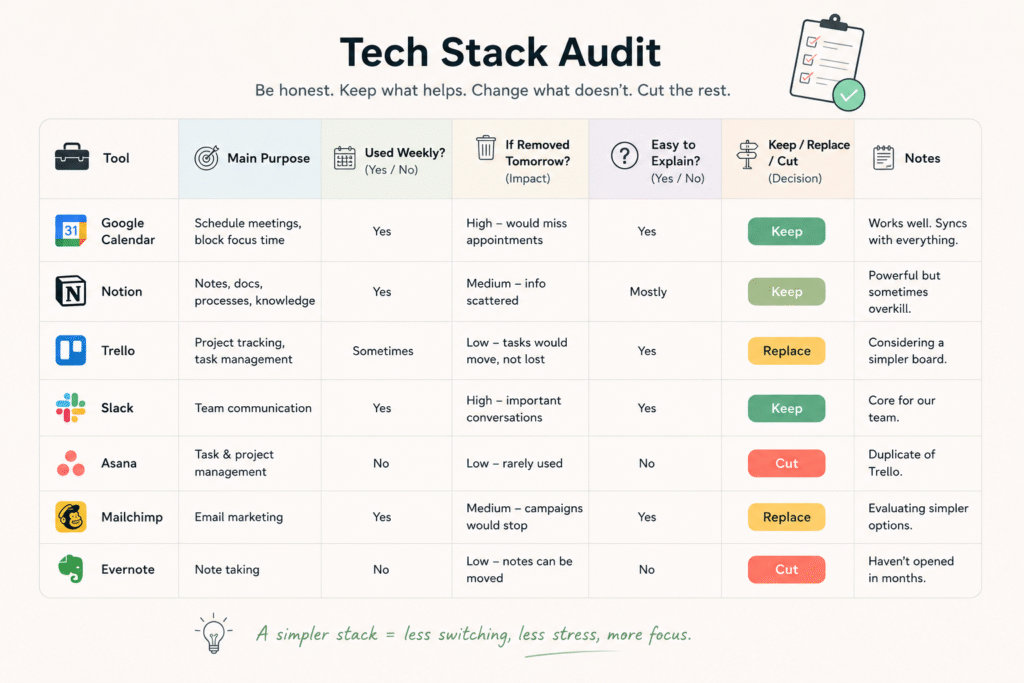
For each tool, ask three questions:
What is this actually doing for my business right now? Not what it was supposed to do when you signed up. What it does today, this month, in your actual day-to-day work.
Would I notice if it disappeared tomorrow? Be honest. Some tools you’d panic without. Others you’d forget existed until the renewal charge hit your card.
Could I explain how to use this to someone else in under two minutes? If the answer is no, that’s often a sign the tool has become more complicated than the problem it was meant to solve.
Most people find their tools sort into three rough piles after this exercise: the ones doing real work, the ones that used to matter but quietly stopped, and the ones that were never quite the right fit to begin with.
Deciding What to Keep, Replace, or Cut
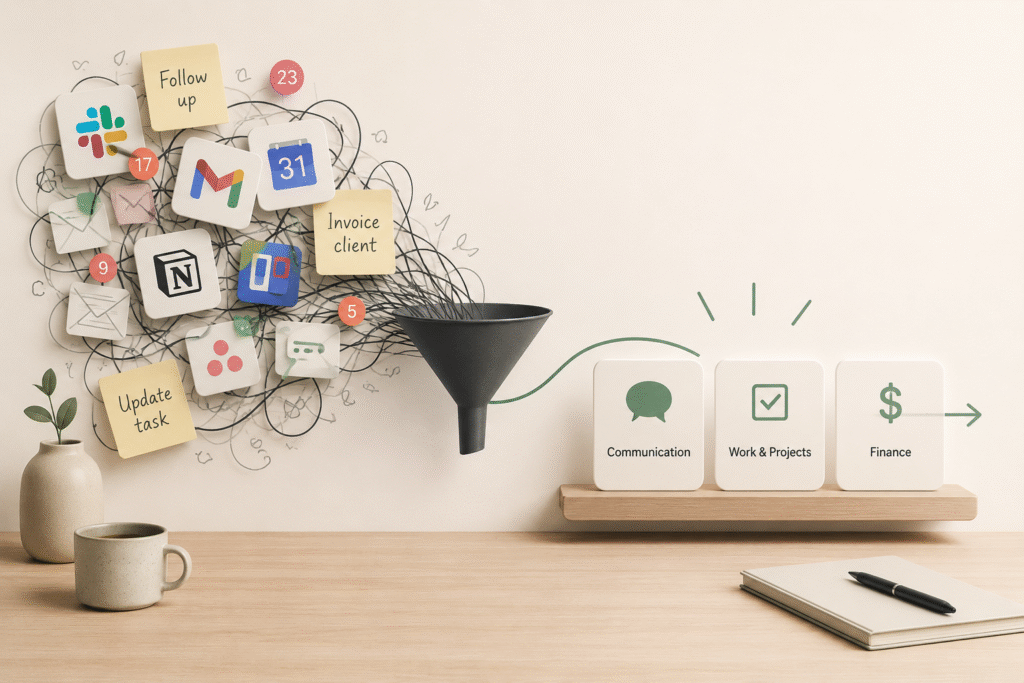
Once you can see the piles clearly, the decisions get easier. Here’s a simple way to sort them.
Keep it if the tool answers “yes” to all three audit questions and it fits naturally into how you already work. Don’t fix what isn’t broken just because a shinier option exists.
Replace it if the tool is doing something important but doing it badly, or if it’s one of three apps all trying to do the same job. Neda didn’t need a second invoicing system as a safety net. She needed one system she trusted enough to stop doubling.
Cut it if you hesitated on any of the three questions, or if you genuinely can’t remember the last time you opened it. Cancelling something you’re not using isn’t a loss. It’s just removing weight you were carrying for no reason.
One thing worth saying clearly: you don’t need to end up with the fewest possible tools. You need to end up with the fewest tools that still do the job well. A stack of three apps that talk to each other and that you actually use is better than one clunky “all-in-one” platform you fight with every week.
Building a Setup That Supports the Work, Not the Other Way Around
Here’s where a lot of advice stops short. People cut tools, feel lighter for two weeks, and then slowly rebuild the same clutter because nothing changed about how decisions get made going forward.
A simpler tech stack only stays simple if it sits inside a bigger system, one where you have a clear reason for every tool you use and a habit of reviewing that list on purpose, not just when things get overwhelming enough to force it.
This is really the difference between organizing your tools and systemizing your business. Organizing is a one-time cleanup. Systemizing means building the habits and structures so the mess doesn’t quietly come back in six months. If you want the fuller picture of what that looks like in practice, I walk through it step by step in How to Systemize Your Small Business in 5 Steps, which picks up right where this audit leaves off.
For Neda, the shift wasn’t about finding a perfect all-in-one platform. It was about consolidating client communication into one place, connecting her invoicing to her calendar so payment reminders sent themselves, and giving herself a standing fifteen-minute review every quarter to ask whether each tool still earned its spot. Her stack went from eleven tools to four. More importantly, she stopped being the one holding all the pieces together in her head.
The Doubts That Keep People Stuck
If part of you is resisting this whole idea, that’s normal. A few things I hear a lot:
“What if I need that app later?” Most tools you’re unsure about can be reactivated in minutes if you genuinely need them again. The cost of keeping something you don’t use is ongoing. The cost of re-subscribing later, if it even comes to that, is small.
“I don’t have time to redo my systems right now.” You don’t have to overhaul everything this week. Start with the audit alone. Just seeing the full picture usually makes the next step obvious, even if you act on it gradually.
“I already paid for this, so cancelling feels like wasting money.” The money is already spent either way. The only question left is whether you keep spending more of it, and more of your attention, on something that isn’t earning its place.
A Simpler Way Forward
You don’t need a bigger tech stack to run a more capable business. In most cases, you need a smaller one built with more intention.
If this article has you thinking about your tools differently, that’s the first shift. The next one is turning that awareness into an actual system you don’t have to rebuild every few months. My free chapter, Simple Systems for Small Businesses, walks through exactly how to structure the tools, habits, and workflows that keep a small business running smoothly without you holding everything together manually. [Download it here.]
And if you’re curious about the bigger picture beyond just your tools, how the way you work day to day can shift from constant hustle to something steadier, you can grab the free first chapter of my book, From Hustle to Flow, which goes deeper into that shift.
Frequently Asked Questions
How many tools does a solo business actually need? There’s no universal number, but most solo entrepreneurs can run a lean operation on four to seven core tools: one for communication, one for scheduling or project tracking, one for finances, and a small handful of specialized tools for their specific work. More than that usually signals overlap rather than genuine need.
What’s the real difference between a messy stack and a lean one? A messy stack has tools doing overlapping jobs with no clear owner for each task. A lean stack has each tool covering a distinct, necessary function, and you could explain why each one exists in a single sentence.
Should I cancel tools immediately or transition first? For anything holding active client data or ongoing work, export or migrate what you need before cancelling. For tools you haven’t opened in months, there’s usually nothing to transition. Just cancel.
Isn’t more automation always a good thing? Automation helps when it removes a repetitive task you actually do often. It becomes a burden when you’re automating something rarely used, or when the automation itself needs constant fixing. More automation isn’t the goal. Less friction is.